
Git Deleted Branch Recovery: Bringing It Back with reflog and fsck
Summary: A step-by-step guide to finding and recovering a deleted Git branch using reflog. Also covers how to find dangling commits with git fsck --lost-found when reflog has expired and has no record, along with gc retention periods.
Goal
Recover a specific deleted commit point into a separate branch.
Situation
After deleting a branch, there are cases where you need to restore the branch back to the commit you were working on in that branch.
1. Finding the recovery point (commit hash) with reflog
Even if a branch has been deleted, reflog still keeps a local record of where HEAD has moved, so it’s useful for finding the commit hash to recover.
1git reflog
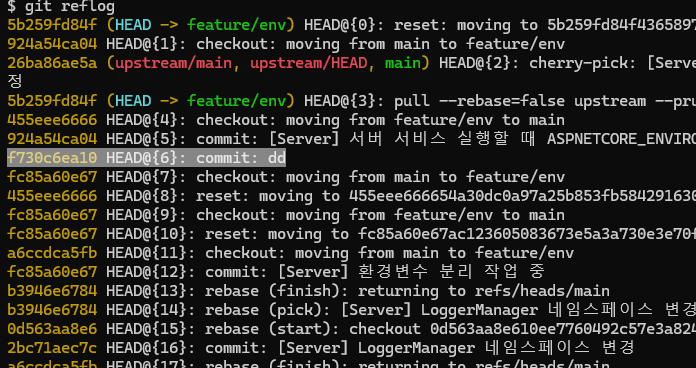
Selecting the recovery target
In the reflog output, check the commit hash of the point you want to recover.
2. Recreating the branch from the commit hash
Create a new branch based on the commit hash you found, and check it out immediately.
1# git checkout -b <name of the new branch to recover> <deleted commit hash>
2git checkout -b repair-1234 f730c6ea10
3. Verifying the recovery
Check that the branch was created successfully and that it has moved to that commit.

When there’s no record in reflog
reflog is a record of where HEAD has moved on this computer. So it won’t help in the following cases.
- The branch was never checked out on this computer
- The repository was freshly cloned
- The reflog entries have already expired
reflog retention period
reflog entries don’t stay forever. They get cleaned up according to the following settings when git gc runs.
1# Retention period for reflog of reachable commits (default 90 days)
2git config --get gc.reflogExpire
3
4# Retention period for reflog of unreachable commits (default 30 days)
5git config --get gc.reflogExpireUnreachable
Commits from a deleted branch usually become unreachable, so the default 30-day period is the practical recovery limit.
Finding dangling commits directly
If it’s not visible in reflog, check the object store directly.
1git fsck --lost-found
2
3# Result
4# dangling commit f730c6ea10ffc0d1f2f8b0e9a1c3d5b7e9f10234
5# dangling blob 8a9f2c1b...
After checking the contents of the commit you found, restore it as a branch.
1# Check the commit contents
2git show f730c6ea10
3
4# Create the branch (without checking out)
5git branch repair-1234 f730c6ea10
Note) If git gc --prune has already cleaned up that object, it cannot be recovered locally.
If the branch was on a remote and got deleted
If the remote branch was deleted and there’s no record locally either, you won’t be able to find it with local reflog. In this case, it’s faster to check whether the commit still remains in another team member’s local repository.
When pushing the recovered branch back to the remote, run the following.
1git push -u origin repair-1234
Summary
- If it’s right after deletion,
git reflogis enough. - If time has passed and it’s gone from reflog, find the dangling commit with
git fsck --lost-found. - However, if
gchas already cleaned up the objects, local recovery is impossible, so it’s safer to tag important working branches before deleting them.
1# How to leave a safety net before deleting
2git tag backup/feature-1234 feature-1234